Friday, 26 February 2010

Skills audit: Livetype and soundtrack pro


Today we were given an introduction to LiveType and Soundtrach Pro. Two professional grade software application that would obviously be need in the creation of our opening thriller sequence.

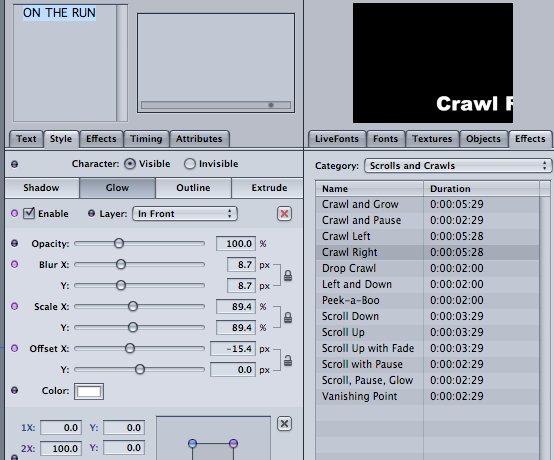
LiveType allowed to us to create titles that could easily be exported to our film in final cut. It included many features giving you the ability to change just about anything you wanted; Some of the things i enjoyed played around with were the transition effects, their was a huge range and adjusting them on the timeline gave you another degree of control over the way your text could appear, it was easy to adjust the speed and with many effects you had access to the character movements in all direction with a bit of simple tweeaking. This program allows you to change the whole text or apply different style to individual characters and i experimented with drop shadows, glows, colour tints, rotation. Each can be altered to a surprisingly high degree, for example the density of the glow or the angle and position on the x/y axis of the shadows.

Soundtrack pro
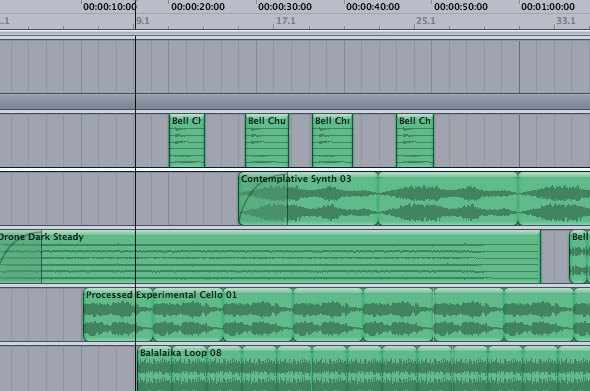
much like the other programs we used soundtrack pro is based around a timeline with different layers for seperate musical instruments, rythems and beats. It has an extensive database of souds from one off effects to background music loops and it's easy to place them on the timeline, overlapping different layers and dragging the mouse to simply extend and sorten the sounds. I worked out a way to fade sounds by dragging the corner of bars down and along itself, which worked well but i would like to spend some more time with this software if i get the chance as it's obviously a powerful tool with far greater potential than what i was able to produce with it today


[Above a little clip of a thriller-esque sountrack i was experimenting with during this skills audit - Nothing will show if accessing via a connection that blocks flash eg. the college internet, sorry can't be helped!]

I hope we are able to transfer the skills from this lesson onto our final production.

Pitching our idea

Pitch

I've uploaded our pitch on a site called scribd so it can be easily viewed at anyone's leisure, it includes our production schedule amongst everything else. Pitching was an informative experience where we were able to get feedback from people more experienced in the industry

Wednesday, 24 February 2010

Match Cut | Prelim Task | Holly


Unfortunately i was sick the day my group were editing the preliminary match cut we did together. Since it was important i prove i can edit for my teachers i was happy to go out and film again and instead i edited the clip above. It went well and i think the match cut opening the door works well. When filming the shot-reverse shots we wanted to experiment with point-of-view shots and so decided to use them instead of over the shoulder for the dialogue exchange since the task didn't state a preference. They allowed you to emphasize with the characters more than over the shoulder shots where you feel more like an onlooker. Over the shoulder might have given it more of a professional feel overall however that was irrelevant with this exercise. While the emphasis of this exercise was creating a match cut we were also told to be careful not to break the 180 degree rule, a new guideline we were introduced to that is common knowledge when filming. Simply put, when two characters are conversing and we imagine a line going straight through them both we mucst be careful to keep the camera over on one side. If you where to cross over sides the characters lose there left/right relationship and it can become confusing to the viewer or just uncomfortable to watch.


Thursday, 18 February 2010

Planning preliminary match cut exercise including storyboard

My group and I chose to make a class report scenario for the match cut exercise we had to do, we done this in a classroom, the clip begins by showing the student walking down the corridor into the classroom looking very nervous, there will be a long-shot of the student as he is walking towards the camera and close-ups on his feet and face. The original idea for the next scene was an Ariel-shot but this was declined as it would look unprofessional. When the student takes a seat there will be a quick over the shoulder shot of the teacher holding her notes. Once the student has been seated the camera will reverse from the teacher to the student as they speak so you can see the facial expressions, the camera will be a mid-shot.

Tuesday, 16 February 2010

Sunday, 14 February 2010

Skills audit: Livetype and sound

In Friday’s lesson we learnt how to use Livetype and soundtrack pro, I found soundtrack pro much more intriguing and enjoyable. I did not have any difficulties with it, it was fun listening to all the beats and mix and matching them. All you had to do was listen to a sound and if you liked it you just drag it to the timeline to make a soundtrack. The program was pretty easy and straightforward to use.


Livetype was also easy and straightforward to use, it had various animations for text types. To change your text you would insert text into a textbox then click on the tabs to change font, size and animate it, you could also animation the background.

Friday, 12 February 2010

planning preliminary match cut exercise including storyboard

for the match cut exercise we decided in making a class report scenario which was held in a classroom, this clip would only have the teacher and the student acting. the short clip was expected to star to of with with the student walking down the corridor looking distressed and
worried about is future at the collage, the camera would catch him walking down the corridor to wards the camera, the next shot was a closeup of the students facial expressions and have him breath deeply as he is about to enter the room, this shot will be at a low angle, a followup shot of the student gripping the door handle, as he enters the student will be cough by an extreme long shot showing his surroundings. as he is about to sit down the camera takes an over the shoulder shot of the teacher shuffling the paper in her hands.

when the student and teacher are settled down the camera will do a shot reverse shot starting with the teacher telling him what he has to improve on and giving him advice on what to do. In the story board the camera was supposed to take an areal shot of the two talking but that was refused because the areal shot wont make sense and would make the clip look very unprofessional. the 180 degree rule wouldnt be broken because we decided to set the interview table beside a wall. at the end of the interview the teacher would tell the student good news that he got into music in university, the student would be shockingly surprised.

that was our storyboard on the match cut exercise.